
Digital menu · QR code · Website and TV
A digital menu for your restaurant.
Photos, prices, allergens and today's specials on one live page. Update it from your phone. Customers open it from a link or a QR code.
Free to startNo credit cardLive in under 10 minutes

- 14
- EU allergens you can tag on any dish
- 24/7
- Customers can read your menu even when you're closed
- 1 link
- Table, Google, Instagram and WhatsApp, all showing the same menu
The short version
A digital menu is a live page, not a PDF.
A digital menu for a restaurant is a web page customers open on their phone, from a link or a QR code. It shows your dishes with photos, prices and allergens, sorted by category, with your hours and location on the same page.
The difference from a PDF or a photo of the paper menu: it's live. Change a price in the editor and every customer sees the new price, on the table and on Google, without a reprint and without asking anyone.
- Photos, descriptions and prices for every dish
- Categories and sub-categories, with search and filters for customers
- Allergen tags and a sold-out badge you switch on from your phone
- Your hours, your address on a map, and one-tap call or WhatsApp
- A QR code and a short link that always point to today's menu
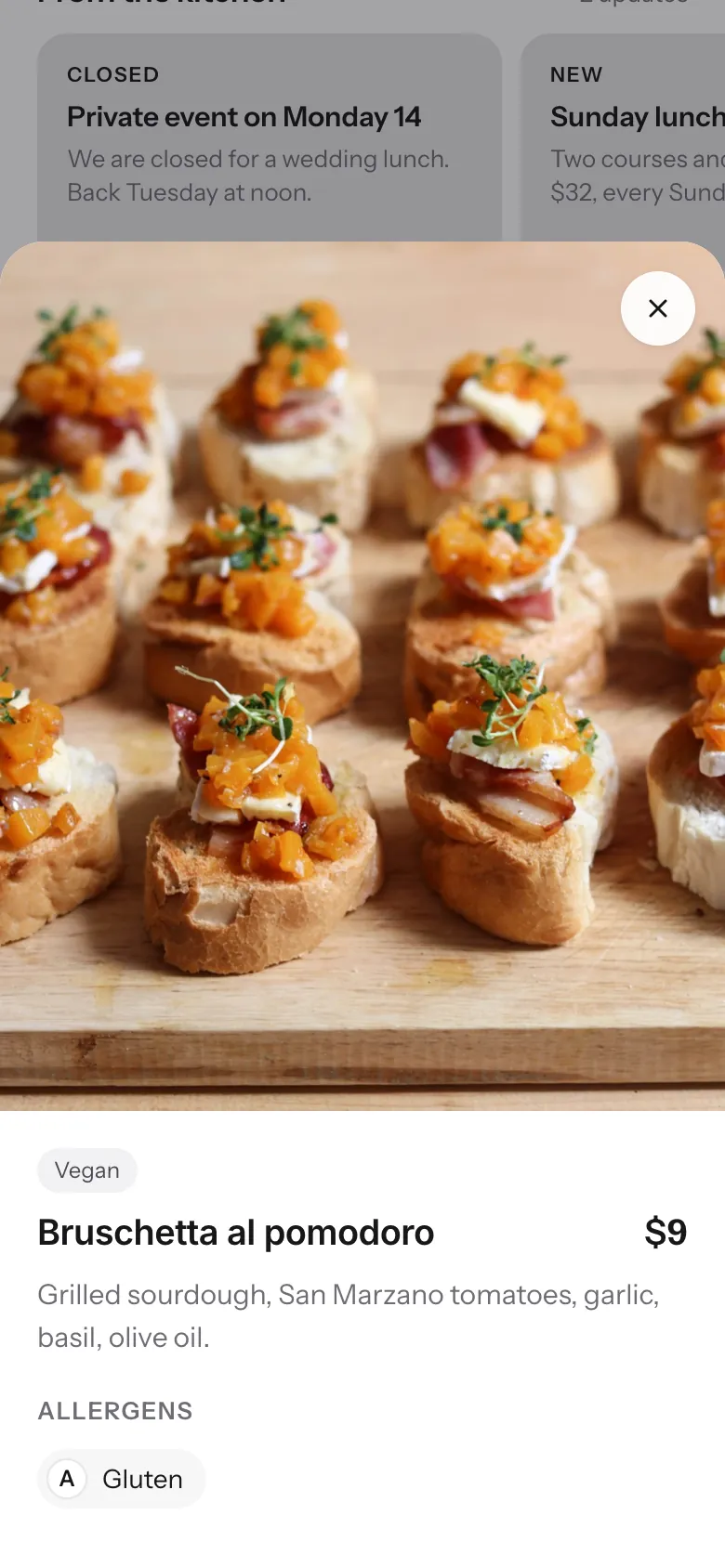
Printed, PDF or digital
Customers order from the menu they can see.
A printed card or a PDF shows the menu you had when you made it. A digital menu shows the menu you have now.
Printed or PDF
Digital menu on 1FoodMenu
Printed or PDF: Sold out at 8pm, still on the card at 9
Digital menu on 1FoodMenu: Mark it sold out from your phone. It shows as sold out on every phone right away
Printed or PDF: Allergens on request, if the waiter knows
Digital menu on 1FoodMenu: Allergen tags on every item, visible before they order
Printed or PDF: Tonight's special is on a chalkboard that only seated customers see
Digital menu on 1FoodMenu: Add the special from your phone. It's on the page Google links to
Printed or PDF: Forty dishes on one long card
Digital menu on 1FoodMenu: Categories with search and filters. The burger is two taps away
Printed or PDF: New prices in autumn mean new cards, a new PDF and a new photo on Google
Digital menu on 1FoodMenu: Edit the price once. Table, Google and Instagram show the same number
Printed or PDF: Descriptions cut short to fit the paper
Digital menu on 1FoodMenu: Room for a photo and a proper description of every dish
What's inside
Everything a digital restaurant menu needs.
Photos and descriptions
Take a photo of the dish in the kitchen and upload it from the same phone. The page resizes it so it loads fast on mobile data.
Live updates and sold-out
The kitchen runs out? Tap the dish. Whoever opens the menu next sees it marked sold out. New prices and specials work the same way.
Allergen tags
The 14 EU allergens, per dish. Customers filter the menu by what they can't eat, before anyone at the table has to ask.
Hours for every day
Set the hours once. The page tells customers if you're open right now and when you open next.
Address, map and one-tap contact
Your address on a map, with call, WhatsApp and directions buttons. Nobody has to search for your number.
QR code included
Every menu comes with its own code, ready to download. Sizes, placement and printing tips are on the QR code page.
How customers find it
One link, in every place customers look.
Your menu page has one address. Put it everywhere customers already are, and it stays current in all of them.
In your Business Profile.
Paste the link into the Menu and Website fields. Someone searching “pizza near me” sees today's menu, not an old photo.
Instagram and WhatsApp
In your bio and your replies.
One link in the bio. When someone messages “do you have a menu?”, you send the link and it's answered.
At the table
On a code customers scan.
Customers who'd rather not wait for the paper menu scan the code and browse with photos. What to print, how big and where to put it are covered on the QR code page.
About the QR code menuBeyond the phone
The same digital menu on your website and your TV.
With Pro, the menu on this page shows in two more places. You still edit it once.
Your website · Pro
Instead of the PDF link.
Paste one line into a page on your website. Visitors see the dishes, photos and prices from your menu page, not a file to download.
How it works on your websiteThe TV in your restaurant · Pro
A digital menu board from the same menu.
Open one link in the TV's browser and pick one of four designs: menu board, photo slideshow, photo grid or spotlight. A dish you mark sold out shows there within two minutes.
How it works on a TVThe free alternatives
Free ways to put a menu online, and what each one misses.
Every one of these costs nothing. Every one of them leaves a customer question unanswered.
A feed, not a menu.
Prices are hidden in captions, the order is whatever you posted last, and Instagram decides who sees it. There is no way to say a dish is sold out.
A PDF in Google Drive
A document, not a page.
It opens in a viewer, the text is tiny until they zoom, and it says nothing about your hours or where you are. Every edit is a new upload and a new link.
Google Business Profile menu
Only on Google.
Useful for the search result, and nowhere else. Nothing for the table, the bio or a WhatsApp reply, and every change means editing dish by dish in the Google app.
How it works
From the card to the page in three steps.
- 01
Start from the card you have
Type in the categories, dishes and prices as they are today. The page is live from the first dish.
- 02
Add photos and allergens
Phone photos are fine. Tag allergens per dish so customers can filter. Set your hours and address.
- 03
Put the link where customers look
Your Google profile, your Instagram bio, your WhatsApp replies, and a code on the table.
Pricing
Start free. Add your website and TV with Pro.
Your menu page and QR code stay free, with no end date. Pro also takes the ads off.
Free to start
$0
No credit card required · ads shown
- Your page
- QR code
- Website (not included)
- TV (not included)
- Your own page at 1food.menu/@yourname
- Categories, dishes, prices and allergens
- A photo and description for every dish
- A QR code, ready to print
- Call, WhatsApp, directions and link buttons
- Food trucks: locations, schedule, live map
Pro
No ads$129/year
Annual plan · secure payment via Stripe
- Your page
- QR code
- Website
- TV
- Everything in Free
- Your menu on the TVs in your shop
- Your menu on your own website
- No ads on any screen
- Updates: offers and notices on your page
Your menu as a web page instead of a printed card or a file. Customers reach it by tapping a link or scanning a code, and what they see is whatever you saved last.
A PDF is a copy of the menu from the day you made it. It can't show that a dish sold out at 8pm, it can't be searched, and on a phone it opens in a document viewer. After three edits, the version on Google, the one on the table and the one in your WhatsApp replies are three different menus. A digital menu page has one version, and it's always the latest.
Open the editor on your phone, tap the dish, type the new price, save. Whoever opens the menu next sees it. Adding a special or hiding a dish works the same way.
Yes. Anything with a menu and opening hours: cafes, bars, bakeries, pizzerias, canteens. Restaurants are just the biggest group.
For most independent restaurants, no. The page covers what customers actually check: menu, hours, location and how to reach you. If you already have a website, keep it: with Pro it shows the same menu, so there is no PDF to update.
No. It's a menu, not a checkout. Customers see a call or WhatsApp button under the menu and order the way they do with you today. Nothing changes in the kitchen.
Nothing to install, for you or your customers. You edit the menu from the dashboard in your phone's browser, and customers open the page from a link or a QR code. Any phone works.
Free: the page, categories, dishes, photos, allergens, sizes and add-ons, hours, location, the QR code and the link, with ads shown on the page. Pro shows the same menu on your own website and on the TV in your restaurant, removes the ads and adds Updates. The free plan has no end date and no card on file.
Yes, with Pro. Open the screen's link in the TV's browser, on a smart TV, a Fire TV stick or a laptop. It shows the same dishes, photos and prices as your page, and changes within two minutes of an edit.
No. A phone photo in daylight, close to the plate, does the job. Upload it from the same phone and the page handles the resizing. You can swap in better photos any time.
Put your menu online before the next customer looks for it.
Start with what's on the card today. Add photos and allergens as you go. The page is live either way.
Free to startNo credit cardLive in under 10 minutes