QR code menu · Included with every page
A QR code menu for your restaurant.
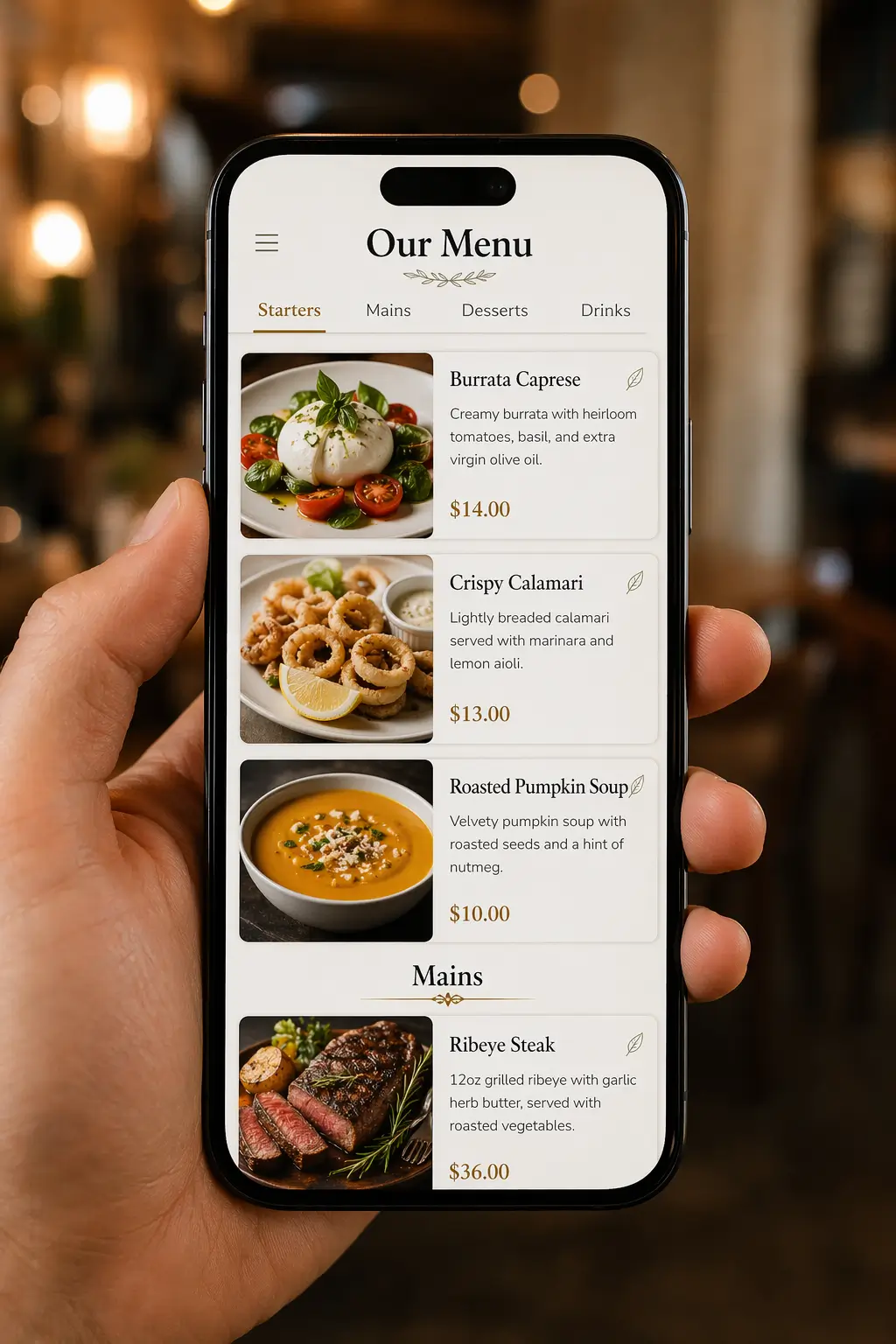
Customers scan the code and open your live menu with photos and prices. Change anything later. The code never changes.
Free to startNo credit cardLive in under 10 minutes

- 1
- Code to print, however often the menu changes
- 0
- Apps for customers to install
- Any size
- From a table sticker to a window poster
The short version
A QR code menu is a link, printed.
The code holds one thing: the address of your menu page. Customers point their camera at it and the page opens in the browser. No app, no typing.
So there are two parts: the printed code, which you make once, and the page it opens, which you keep editing. On 1FoodMenu they come together. Every page gets its own code the moment it goes live, and the code keeps opening the page as long as you keep the same page name.
- Made for you when your page goes live
- Download it from your dashboard as a print-ready file
- Opens with the camera app on iPhone and Android
- One code for tables, window and takeaway bags
- Behind it: your live menu, hours, map and call button
Step by step
How to create a QR code menu for your restaurant.
A QR code is a shortcut to a web page, so the page comes first. The whole thing takes under ten minutes. Printing takes longer than the setup.
- 01
Build the page the code opens
Menu first, code second.
This is what customers see after the scan, so it's the step that takes the most time:
- Sign up and name your page. Two minutes, no card
- Add categories, then dishes with prices, descriptions and photos
- Set your hours and address. Changes go live as you save
- The page is live from the first dish, and the code with it
- 02
Download the code
It's already in your dashboard.
No separate tool, nothing to set up:
- Made from your page address the moment the page is live
- One print-ready file, sharp at any size
- Edit the menu as often as you like. The code doesn't change
- Only renaming the page would change it, so pick a name and keep it
- 03
Test, then print
Scan it before you print a hundred.
Five minutes now saves a reprint later:
- One iPhone, one Android. Both should open the page in under three seconds
- Test in your real lighting: daylight at the window, dim at the table
- Open the link and check categories, photos, prices and hours
- Then print: table cards, a window sticker, the takeaway bag
QR to a PDF, or QR to a page
A QR code is only as good as what it opens.
Most free QR generators point the code at a PDF. It works once. Then the menu changes.
QR code to a PDF
QR code to your 1FoodMenu page
QR code to a PDF: A price change means a new PDF, and often a new code to reprint
QR code to your 1FoodMenu page: Same code, new menu. Nothing to reprint
QR code to a PDF: Opens in a document viewer. The text is tiny until they zoom
QR code to your 1FoodMenu page: Opens as a page built for a phone screen. No zooming
QR code to a PDF: On some phones the PDF downloads before it opens
QR code to your 1FoodMenu page: Nothing to download. It opens like any web page
QR code to a PDF: Ends at the last page. No way to call you or find you
QR code to your 1FoodMenu page: Hours, map and a call button are under the menu
QR code to a PDF: Looks different in every PDF app
QR code to your 1FoodMenu page: The same layout on every phone
QR code to a PDF: No idea if anyone scans it
QR code to your 1FoodMenu page: You see how many people opened the page today
Where to put it
Print it once, put it everywhere.
One code opens one page, so every placement stays current without reprinting.
On every table
Where customers decide what to order.
A table card or a small sticker. Customers browse with photos before the waiter arrives, and order faster.
On the window
For the people walking past.
They scan, see the menu and the prices, and decide to come in. Add your hours so they know when.
On bags, flyers and cards
The menu goes out with every order.
Takeaway bags, delivery boxes, business cards. The same code, always pointing at today's menu.
On the TV menu board · Pro
In the corner of the screen.
Your TV shows the same menu, with the code in a corner. Customers in the queue scan it and read the full menu, photos and allergens on their own phone.
Your menu on a TVWhat's included
The code, and why it never needs reprinting.
Made from your page address
The code is made from your page link the moment the page is live. Nothing to set up, no separate tool.
One code that never changes
Edit dishes, prices and photos as often as you like. The printed code still opens your page. Only renaming the page would change it.
Page opens by day
Your dashboard counts page opens by day, so you can see whether a new code on the window brings more people in.
Before you print
Three things that make the code easy to scan.
Size
At least 3 cm wide.
About 1.2 inches, the smallest size phones read reliably from a table. For a window, go 10 cm or more.
Contrast
Dark code, light background.
Black on white always works. Don't print it white on black, don't print it on a photo, and keep a clear margin around it.
Test
Scan it with two phones.
One iPhone, one Android, in your real lighting. If both open the menu in under three seconds, send it to print.
Pricing
Start free. Add your website and TV with Pro.
The QR code comes with the free plan, and so does the page it opens. Pro also takes the ads off.
Free to start
$0
No credit card required · ads shown
- Your page
- QR code
- Website (not included)
- TV (not included)
- Your own page at 1food.menu/@yourname
- Categories, dishes, prices and allergens
- A photo and description for every dish
- A QR code, ready to print
- Call, WhatsApp, directions and link buttons
- Food trucks: locations, schedule, live map
Pro
No ads$129/year
Annual plan · secure payment via Stripe
- Your page
- QR code
- Website
- TV
- Everything in Free
- Your menu on the TVs in your shop
- Your menu on your own website
- No ads on any screen
- Updates: offers and notices on your page
One menu, every screen
Your QR code is one of four screens.
You edit one menu. Your page and QR code show it on Free. With Pro, your website and the TV in your shop show it too.
- Your pageFREEMenu, hours, map and call button
- QR codeFREEOpens your page from the tableYou are here
- Your websitePROOne line of code, same menu
- TV in your shopPROFour designs, opens from one link
Create a page on 1FoodMenu, add your dishes, and the code is made for you. Download it from the dashboard and print it. You don't need a separate QR generator, and you never remake the code when the menu changes.
Yes. The code and the menu page behind it come with every page, on the free plan too.
No. Any recent iPhone or Android reads a QR code straight from the camera. They point, tap the link that appears, and the menu opens in the browser.
No. The code holds your page address, not the menu. Prices, dishes, photos and sold-out badges change behind it. The one thing that would change the code is renaming your page address, so pick a name and keep it.
Yes. The file is sharp at any size. The print tips above cover the minimum width and the margin.
The same menu is a link you can send by WhatsApp or SMS, and it's on your Google profile. A printed copy for the rare case is fine; the code covers everyone else.
Any QR generator can turn any link into a code, but a code that opens a slow home page or a PDF is the real problem. Point the code at your 1FoodMenu page. With Pro your website shows the same menu too, so the code and the site never disagree.
Print the code once and never reprint a menu.
Build the page, download the code, send it to print. Every menu change after that happens on the page, and the code on the table keeps working.
Free to startNo credit cardLive in under 10 minutes