
Food trucks · Schedule · Map · Menu
A food truck website on one page.
Menu, this week's locations and hours. Set the week once. Customers see where you're parked today and where you'll be next.
Free to startNo credit cardLive in under 10 minutes

- Now
- The first line on the page: where you are at this minute
- 1 link
- For the bio, the festival organiser and the side of the truck
- 0
- Daily posts needed to tell people where you're parked
What a food truck needs
What a food truck needs from a website, and what this page does.
A restaurant's customers know where to go. A truck's customers have to find out, every single day. The page is built around that.
Need 1 · Where are you right now?
Today's location, shown automatically.
The first line on the page is today's spot and the closing time, taken from your schedule. Under it, the map with every pin and this week's list. Nobody has to scroll a feed or send a message.
- “Here today · Riverside Market · Until 3:00 PM”
- “Next location · The brewery · Opens Friday 5:00 PM”
- Directions in one tap from any pin
Need 2 · What do you sell, for how much?
The menu, with photos and prices.
People decide in the car park, from a phone. A photo per dish, the price on every dish, and sold out marked from the serving window when the last portion goes.
- Five to eight dishes, in the order you choose
- Sizes, add-ons and allergens per dish
- Search and filters for the queue
Need 3 · Can I reach you?
A button, not a comment thread.
Call, WhatsApp and email sit under your name. Catering enquiries, festival organisers and “can you hold two?” come to your phone, and your hours and photos are already on the page.
- Buttons above the map, on every phone
- A short about section and a gallery for organisers
How the schedule works
The page works out today's location from your schedule.
Every location gets a name, a pin on the map and its own days and hours. Tuesday lunch at the office park, Friday evening at the brewery, Saturday at the market. Type it in once.
From then on the page works it out. At 12:15 on Tuesday it says “Here today · Office park · Until 2:00 PM”. At 3pm it switches to “Next location · The brewery · Opens Friday 5:00 PM”. You haven't touched anything.
- As many locations as your route needs, each with its own hours
- Open or coming up, per location, worked out from the day and time
- Every pin on one map, with directions in one tap
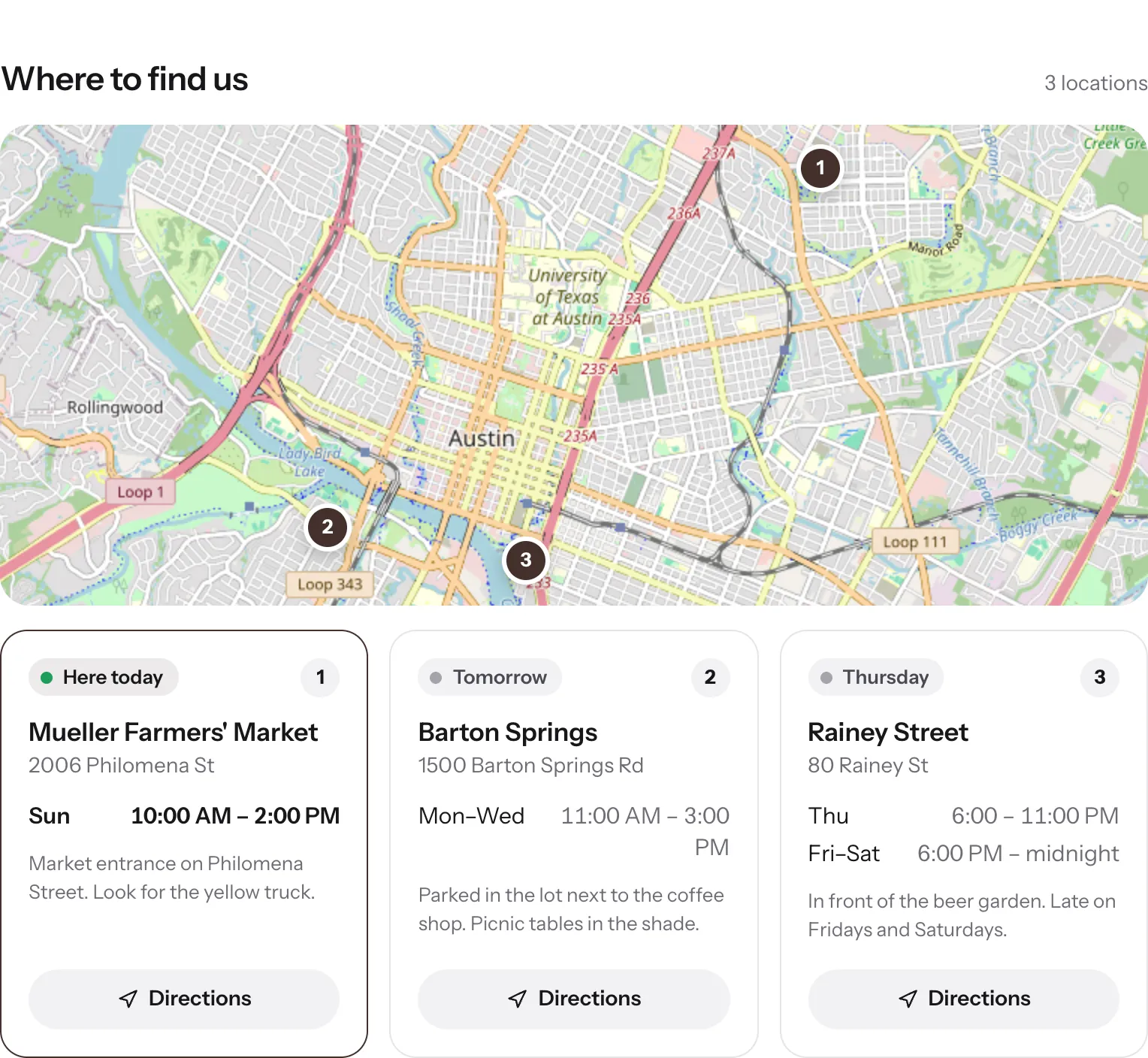
Locations, all the options
Add a location once, change it from the truck.
Every location is a small card in your dashboard. Fill in what you have; the page does the rest.
A regular spot
Name, pin, days and hours.
Name it the way customers say it. Place the pin on the map or paste the address, or paste a Google Maps link if you have one. Then the days and hours, as many time slots as you need.
- “The brewery”: Friday 5 to 9, Saturday 12 to 9
- “Office park”: Tuesday and Thursday, 11:30 to 2
- A note for the page: “behind the brewery, red awning”
A one-off event
Add it for the day, switch it off after.
A festival, a market, a private booking. Add it as a location with that day's hours. When it's over, switch it off; it stays in your list for next year.
- Shows on the map and in this week's list like any other spot
- Off in one tap, back in one tap
- Put it in a scheduled update so people hear about it first
Changes on the move
Skipping a spot? Running late?
Open the dashboard on your phone between customers. Switch a location off for the week, change tonight's hours, move a spot up the list. It's live before the next scan.
- Each location has its own on/off switch
- Reorder the list to match your route
- Open or closed on the page follows the new hours straight away
“Where are you today?”
The question every truck answers twenty times a day.
A story posted at 7am, a pinned post from March, a “find us” page nobody updates. Customers check, guess, and sometimes drive to the wrong place.
Instagram, Facebook or a “find us” page
Your 1FoodMenu page
Instagram, Facebook or a “find us” page: Today's location is in a story that's gone by tomorrow morning
Your 1FoodMenu page: Today's location is the first line on the page, every day, taken from your schedule
Instagram, Facebook or a “find us” page: “Are you still there?” messages while you're serving
Your 1FoodMenu page: The page says “Until 2:00 PM”. They can see it without asking
Instagram, Facebook or a “find us” page: Someone who found you on Friday has no idea where you are on Tuesday
Your 1FoodMenu page: This week's locations sit under the map, with days and hours for each
Instagram, Facebook or a “find us” page: The address is a screenshot of a map
Your 1FoodMenu page: A pin per location. Tap it and Google Maps opens with directions
Instagram, Facebook or a “find us” page: The menu is a photo of the board from two months ago
Your 1FoodMenu page: The menu is live, with prices and photos, and sold out is set from the window
Instagram, Facebook or a “find us” page: Changing a “find us” page means a call to a web developer
Your 1FoodMenu page: You change it yourself, from your phone. No developer needed
What's on the page
A digital menu for your food truck, with the map on top.
Every location on one map
Regular spots and this week's one-offs, each with a pin. Customers tap the one they want and get directions.
Hours and open or closed, per location
The market runs Saturday 9 to 2. The brewery runs Friday 5 to 9. Each location shows its own hours and whether it's open right now.
The menu, with photos
Categories, prices, photos and allergens, the same as a restaurant page. Sold out is one tap from the serving window.
The menu on a screen in the window
ProA tablet or a small TV in the serving window opens one link and shows the menu in big type. Mark a dish sold out and the screen shows it within two minutes.
Call, WhatsApp and email buttons
Under your name, above the map. Catering enquiries and “can you hold two?” messages come to your phone, not to a comment thread.
A QR code for the serving window
Print it once, stick it on the window. The queue reads the menu on their phones before they reach the front. Same code at every location.
Updates and promos
Tell them what's new before they ask.
A dated card at the top of your page, above the menu. Give it a title, a few lines, a photo if you like, and a start and end date. It appears on time and disappears on time. Scheduled updates are a Pro feature.
A new location
“Thursdays at the office park, from next week.”
Announce the new spot a week ahead. On the day, the page already shows it as today's location. The card clears itself after the first Thursday.
A festival weekend
“Street food festival, Sat and Sun. Festival menu only.”
One card with the dates, the short menu and the location. Send the link to the organiser and post it once. Everyone opens the same page.
A new dish or a last day
“New: jerk chicken bao. Weekend only.”
Try a dish for a weekend and say so. Or mark the last weekend of the season. Either way, it's on the page customers already check, not lost in a feed.
Food truck menu ideasWhere the link goes
Put the link wherever people ask where you are.
The page has one address. Everywhere you put it shows this week's schedule, not the week you posted it.
Instagram and TikTok
In the bio, not in the stories.
Post the food. Let the page answer where and when. One link in the bio covers every location, every week.
Festivals and catering
Send the page before the event.
The organiser sees the menu, the photos and how to reach you. No PDF attached to an email, no “can you send your menu again”.
In your Business Profile.
Trucks can have a profile too. Put the page in the Website field so “food truck near me” opens today's location, not a broken link.
How it works
Your truck's page in three steps.
- 01
Add your locations
Name each one the way customers say it: the brewery, Tuesday market, the office park. Place the pin on the map.
- 02
Set days and hours per location
Friday 5 to 9 at the brewery, Saturday 9 to 2 at the market. That's the whole schedule.
- 03
Add the menu, print the code
Dishes, prices, photos. Download the QR code and stick it on the serving window.
Pricing
Start free. Add your website and TV with Pro.
Every location and the weekly schedule are in the free plan. With Pro, a tablet or TV in the serving window shows the menu, and the ads go.
Free to start
$0
No credit card required · ads shown
- Your page
- QR code
- Website (not included)
- TV (not included)
- Your own page at 1food.menu/@yourname
- Categories, dishes, prices and allergens
- A photo and description for every dish
- A QR code, ready to print
- Call, WhatsApp, directions and link buttons
- Food trucks: locations, schedule, live map
Pro
No ads$129/year
Annual plan · secure payment via Stripe
- Your page
- QR code
- Website
- TV
- Everything in Free
- Your menu on the TVs in your shop
- Your menu on your own website
- No ads on any screen
- Updates: offers and notices on your page
One menu, every screen
Your page is one of four screens.
You edit one menu. Your page and QR code show it on Free. With Pro, your website and the TV in your shop show it too.
- Your pageFREEMenu, hours, map and call buttonYou are here
- QR codeFREEOpens your page from the table
- Your websitePROOne line of code, same menu
- TV in your shopPROFour designs, opens from one link
Yes. The page checks the day and time against your schedule and shows the location that's open now, with the closing time. If none is open, it shows the next one and when it opens.
In the dashboard, add a location: a name, the address or a pin on the map (or a Google Maps link), the days and hours, and an optional note like “behind the brewery”. Save. It's on the map and in this week's list straight away.
Yes. Each location holds as many time slots as you need: the brewery on Friday evenings and Saturday all day, as one location. The page works out which slot applies right now.
The live example at the top of this page shows a page with a menu, hours and a location. A truck page looks the same, with this week's locations and the “here today” line above the menu.
Add it as a location for that day and its hours. When the event is over, switch it off. It stays in your list, so next year it's one tap to bring back.
Both, on one link. The top of the page is where you are and when. Under that is the full digital menu with photos and prices. Customers don't care what it's called. They care that it's right.
No. There's nothing to design. Add your logo and your colour and the page uses them. The layout is the same for every truck because it's the layout that works on a phone in a queue.
Yes, with Pro. A tablet or a small TV with a web browser in the serving window opens your screen's link and shows the menu in big type, with photos if you like. It's the same menu as your page, so a sold-out dish changes on both.
Customers open the page on their own data, so the page is up whether or not you have signal. To change something from the truck you need a connection on your phone, the same as posting a story. A screen in the window keeps showing the menu it loaded if the signal drops, and catches up when it's back.
Next time someone asks where you are, send the link.
Add this week's locations tonight. Tomorrow's customers find you without asking.
Free to startNo credit cardLive in under 10 minutes