Menu maker · Live page · Phone, website and TV
A menu maker for your restaurant.
Categories, photos, prices and allergens, typed in once. The result is a live page, not a file. Change anything from your phone.
Free to startNo credit cardLive in under 10 minutes
- 0 files
- Nothing to export, upload or send to the printer
- S · M · L
- One dish, several sizes, each with its own price
- 1 tap
- Mark a dish sold out from the kitchen, and put it back when it returns
Canva, Word or a page
Restaurant menu design software gives you a file, not a page.
Design tools are good at one thing: a menu that looks right on the day you download it. Then the fish price changes, the lunch special rotates, and the file is wrong in three places at once: the PDF on Google, the print on the table, the photo in your Instagram bio.
A menu maker on 1FoodMenu builds something else: one live page. You type the menu in once. Every change after that is on every phone the moment you save. Nothing to export, nothing to reprint.
- Categories and sub-categories, dragged into the order you want
- A name, a description, a photo and a price for every dish
- Sizes with their own prices, and a sale price when you run one
- Add-ons like extra cheese, with a price, on any dish
- Allergen tags customers can filter by
- Sold out or hidden, switched from your phone

Step by step
How to create a restaurant menu, from the card to the page.
Three stages. The first two are the same whatever tool you use. The third is where a live page is better.
- 01
What to include
Gather seven things.
Before you build anything, collect what a complete menu needs:
- Categories: Starters, Mains, Desserts, Drinks
- Dish names customers understand, not kitchen codes
- Prices, always visible
- One photo per dish, from your phone is fine
- A one-line description: main ingredients, how it's cooked
- Allergens per dish
- What's sold out today
- 02
How to organise it
Order it the way people read.
The order of the menu changes what people order. Three rules that work for every restaurant:
- Best sellers at the top of each category. People scan from the top and stop early
- Five to ten dishes per category. Bigger than that, split it: Meat pasta, Vegetarian pasta
- Category names customers already know. Save the creativity for the dishes
- 03
Put it online
Type it in, save, share.
In the menu maker, the whole thing is typing:
- Create the account and name your page
- Add the categories, then the dishes with prices and photos
- Set your hours and address
- Download the QR code. Paste the link into Google and your bio
Four ways to make a menu
Of four ways to make a menu, one stays correct.
Canva, Word and a PDF all give you the same thing: a file that was correct on the day you made it.
Canva, Word or a PDF
Menu maker on 1FoodMenu
Canva, Word or a PDF: Export, upload and reprint every time a price changes
Menu maker on 1FoodMenu: Change the price, save. It's on every phone
Canva, Word or a PDF: A template made for A4, squeezed onto a phone screen
Menu maker on 1FoodMenu: Built for the phone first, with a desktop layout from the same menu
Canva, Word or a PDF: Photos make the file heavy and the print expensive
Menu maker on 1FoodMenu: Photos load fast and cost nothing to add
Canva, Word or a PDF: One drink in three sizes is three lines to keep matching
Menu maker on 1FoodMenu: One dish, three sizes, each with its own price
Canva, Word or a PDF: Extras are listed in a footnote at the bottom
Menu maker on 1FoodMenu: Add-ons are shown on the dish, with their prices
Canva, Word or a PDF: A second design for the menu board above the counter, changed by hand every time
Menu maker on 1FoodMenu: With Pro, the TV shows the same menu as a menu board
Canva, Word or a PDF: The design is the whole job, and it starts over next season
Menu maker on 1FoodMenu: The layout is done. Your only job is the menu
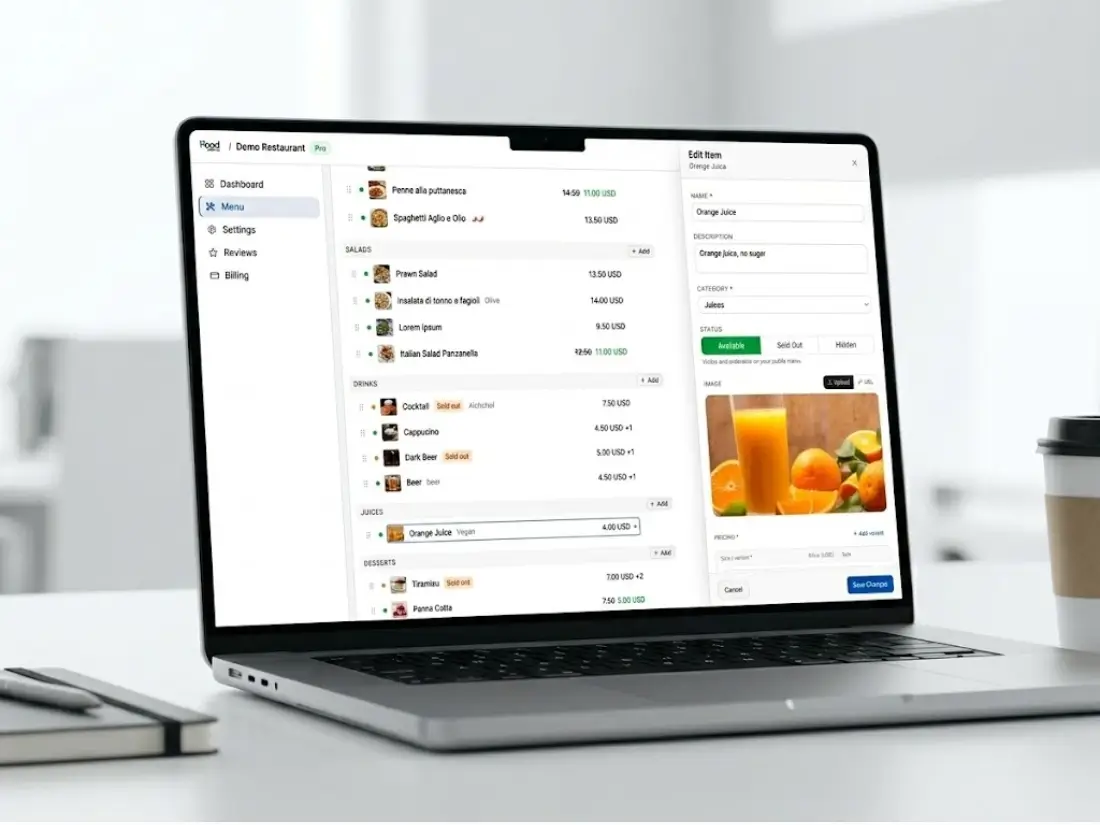
Inside the editor
Everything the menu needs, already designed.
Categories, in your order
Starters to desserts, or lunch and dinner as two main groups. Drag to reorder. Hide a whole category when it's not on.
Sizes, add-ons and sale prices
Small, medium and large on one dish. Extra toppings with a price. A discounted price for a dish while a promotion runs.
Photos from your phone
Take it in the kitchen, upload it from the same phone. The page resizes it so it loads fast on a customer's data plan.
Allergens as tick boxes
Tick what's in the dish. Customers filter the menu to what they can eat, before they have to ask.
Sold out and hidden
Sold out keeps the dish visible with a badge, so people know you usually have it. Hidden takes it off the page until you bring it back.
Phone, website and TV from one menu
You make the menu once. It shows on a phone at the table and, with Pro, on your own website and as a menu board on your TV.
After launch
Three habits that keep the menu right.
A live menu is only better than a printed one if it's true. These take seconds each.
Prices
Change the price the day your supplier changes theirs.
Open the dish, change the number, save. Thirty seconds, from the phone in your pocket, before the next customer scans.
Sold out
One tap to mark it sold out, one tap to bring it back.
The last portion goes at 8pm? Mark it sold out from the kitchen. When the delivery comes in tomorrow, tap it back.
New dishes
A phone photo today beats a studio photo next month.
Shoot the plate in daylight before service and upload it straight away. You can replace it later. The dish is on the menu tonight.
Pricing
Start free. Add your website and TV with Pro.
Photos, sizes and allergens are all in the free plan. Pro also takes the ads off.
Free to start
$0
No credit card required · ads shown
- Your page
- QR code
- Website (not included)
- TV (not included)
- Your own page at 1food.menu/@yourname
- Categories, dishes, prices and allergens
- A photo and description for every dish
- A QR code, ready to print
- Call, WhatsApp, directions and link buttons
- Food trucks: locations, schedule, live map
Pro
No ads$129/year
Annual plan · secure payment via Stripe
- Your page
- QR code
- Website
- TV
- Everything in Free
- Your menu on the TVs in your shop
- Your menu on your own website
- No ads on any screen
- Updates: offers and notices on your page
One menu, every screen
Your page is one of four screens.
You edit one menu. Your page and QR code show it on Free. With Pro, your website and the TV in your shop show it too.
- Your pageFREEMenu, hours, map and call buttonYou are here
- QR codeFREEOpens your page from the table
- Your websitePROOne line of code, same menu
- TV in your shopPROFour designs, opens from one link
If the menu has to be online and change often, a menu maker that gives you a page beats one that gives you a file. 1FoodMenu is free to start, with categories, photos, prices, sizes, allergens, a link and a QR code. The result is a live page customers open on their phone.
No. The editor runs in the browser, on a phone, a tablet, a Mac or a PC. Log in and edit. There's nothing to install for you and nothing for your customers either.
There are no templates to pick from, on purpose. The layout is the one that works on a phone in a customer's hand, and your logo and colour make it yours. You start from the menu you have today, not from a blank design.
A menu of twenty dishes takes about fifteen minutes to type in, plus the photos. Most owners do it from the printed card in one sitting and add photos over the following days.
Not as a file. You type the dishes in, which for a normal menu is quicker than fixing a layout. Keep the Word or Canva version if you still want a printed one. The page is the one that stays current.
Yes. Make Lunch and Dinner your main categories with the dishes underneath, and give each one serving times. Your page says when each is served, and a TV menu shows only what's served right now.
Yes, with Pro, and there is nothing to design. Pick a menu board, a photo slideshow, a photo grid or a spotlight, and open one link in the TV's browser. It uses the menu you already made, so a new price shows there too.
Type in tonight's menu once.
Twenty dishes take about fifteen minutes. Every change after that takes seconds.
Free to startNo credit cardLive in under 10 minutes