
Accent colour
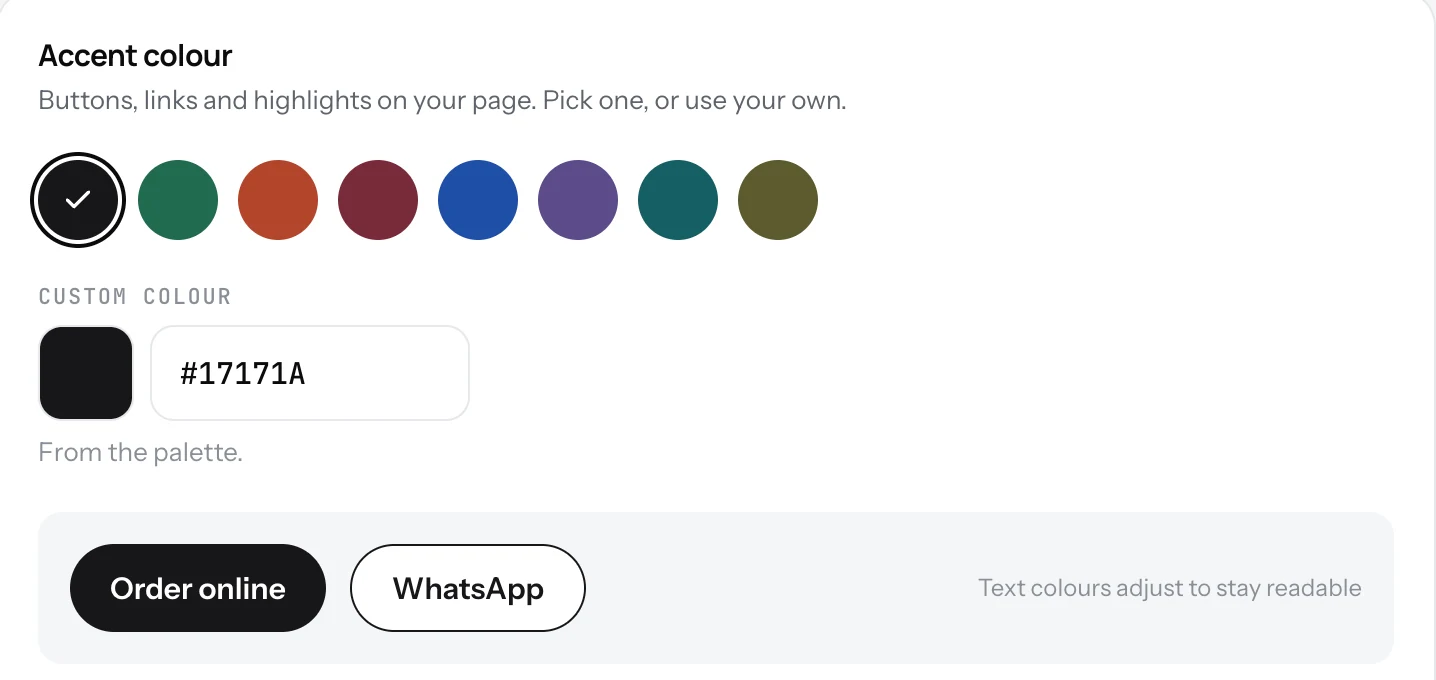
The colour of the buttons, links and highlights on your page. Pick one of eight, or type your own.
Your page is already designed. The one thing you choose is the accent colour: it colours the main button, the links and the highlights.
Pick a colour
- Open Settings and pick the Page tab.
- Under Accent colour, tap one of the eight colours.
- Or click Custom colour and type your brand's hex code, or open the colour picker.
- Save. The preview button shows the result before you do.
Good to know
- Text on the buttons is white, so the colour must be dark enough to read. The form checks this and offers a darker version if yours is too light.
- The eight colours are Ink, Forest, Terracotta, Burgundy, Cobalt, Plum, Teal and Olive.
- Match your logo or your sign. One colour, used the same way everywhere, looks intentional.
Related
- Name, logo and descriptionThe top of your page: your logo, your name, one line under it, and a longer text about your place.
- Contact buttonsCall, WhatsApp, Email, Directions and a link of your own, such as ordering. Two of them go under your name.
- What guests seeYour page from top to bottom, as a guest sees it on a phone: cover photo, name and buttons, open or closed, updates, menu, map, contact.