
What's on a TV screen
ProPick the categories a TV shows and their order, or untick single dishes. New dishes show up by themselves.
A screen shows all your categories unless you choose otherwise. Use this to split the menu across two TVs, or to keep the drinks list on the screen by the bar.
Choose what a screen shows
- Open TV and click a screen.
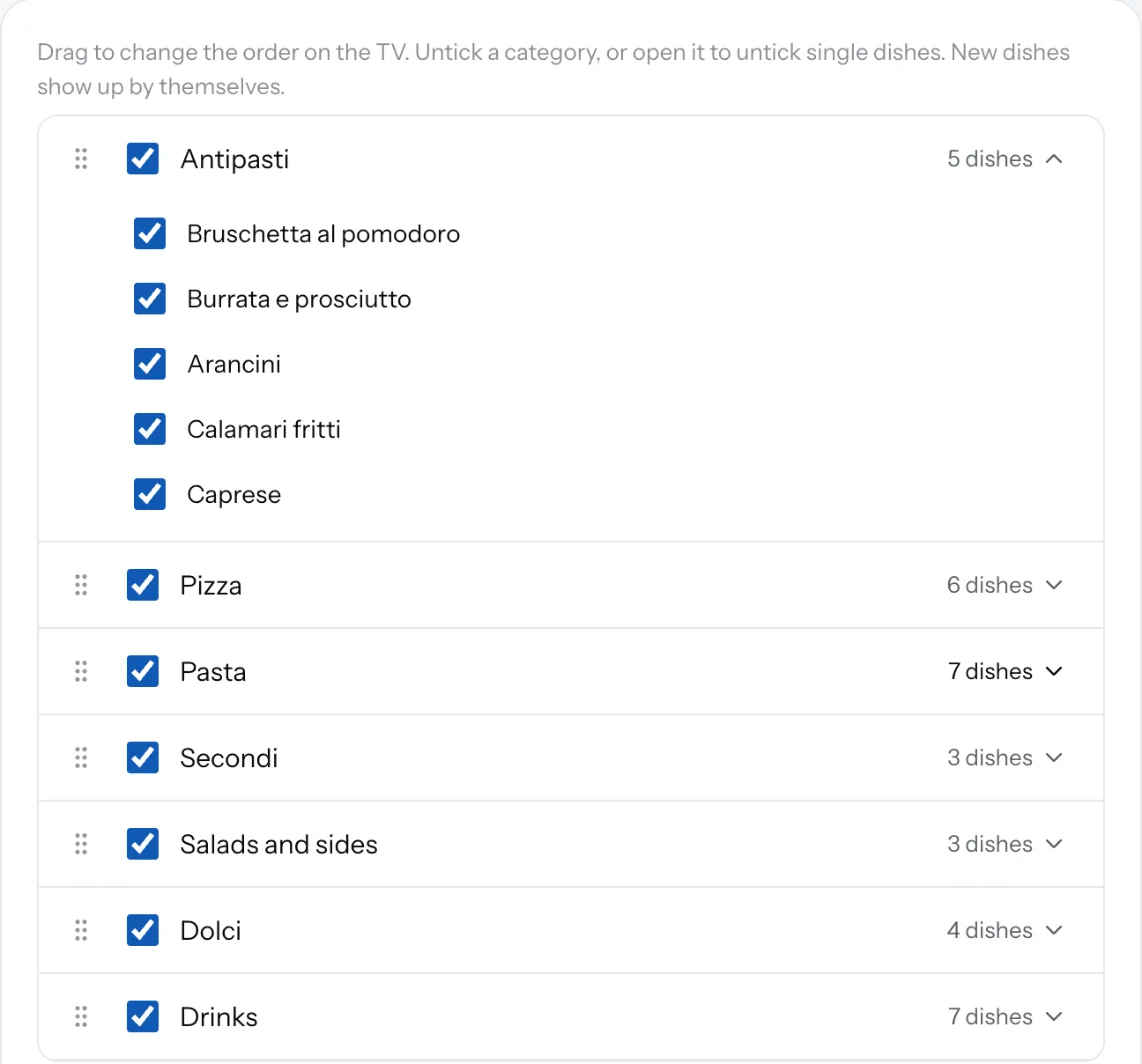
- Under What's on this screen, drag the categories into the order you want on the TV.
- Untick a category to leave it off this screen.
- Open a category and untick single dishes to leave them off.
- Click Save changes. The TV shows it within two minutes.
Good to know
- New dishes in a ticked category show up on the TV by themselves.
- Hidden dishes and hidden categories never show on a TV.
- A category with serving times shows on the TV only during those times, by the TV's own clock. Breakfast goes off at 11:00 with nobody touching the TV.
- A screen needs at least one category.
Related
- TV screen settingsChoose what a TV screen shows and how: dark or light, speed, descriptions, allergens, prices, a QR code and sold-out dishes.
- Serving timesGive a category its days and hours, like breakfast 7:00 to 11:00. Your page says when it's served, and TV screens hide it outside those times.
- CategoriesGroup your dishes into sections like Starters, Mains and Drinks. Guests jump between them on your page.