
Featured dishes
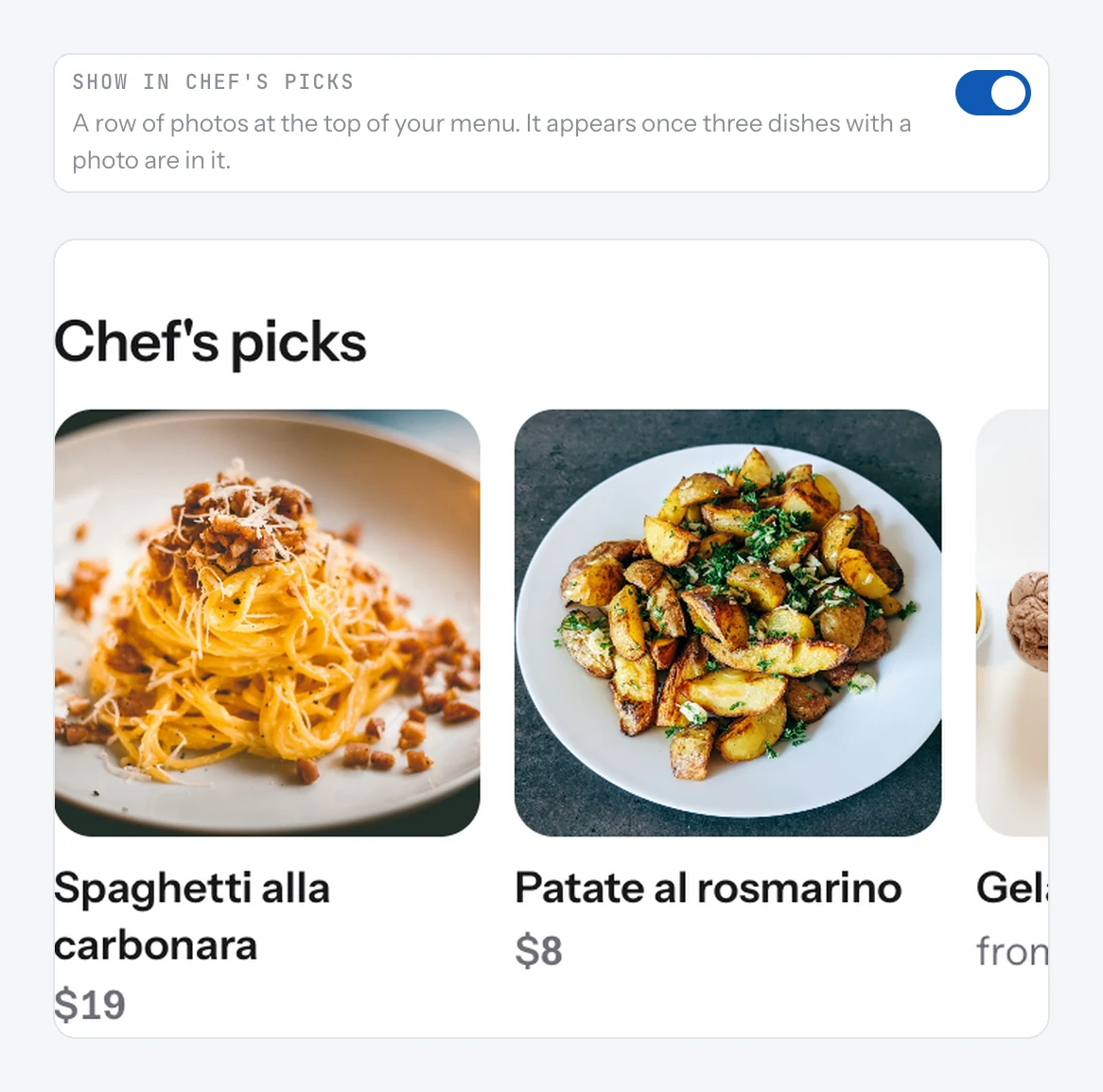
Pick the dishes you want guests to see first. They show in a row of photos at the top of your menu, called Chef's picks or Popular.
Featured dishes sit in a row of photos at the top of your menu, before the categories. Restaurants get a row called "Chef's picks". Food trucks get "Popular".
Feature a dish
- Open Menu and open the dish.
- Check it has a photo. Only dishes with a photo can be featured.
- Turn on Show in Chef's picks (or Show in Popular for a truck).
- Save. Do the same for at least two more dishes.
Good to know
- The row shows once three featured dishes have a photo.
- Featured dishes also get a small "Chef's pick" or "Popular" label when a guest opens them.
- The Spotlight design on a TV screen uses your featured dishes for its big photos.
- Pick dishes you always have. A sold-out dish in the first row is a let-down.
Related
- Dish photosAdd a photo to a dish from your phone or from a link. Dishes with a photo get more attention on your page.
- DishesAdd a dish with a name, price, photo and description. It shows on your page the moment you save it.
- TV designsFour designs for a TV menu: Menu board, Photo slideshow, Photo grid and Spotlight. Each works on a horizontal or vertical TV.