
Prices
One price, or several sizes with their own price. A sale price shows next to the old one, crossed out.
Every dish needs a price. A dish can have one price, or a few sizes with their own price each. Any price can have a sale price for a while.
Set the price
- Open the dish in Menu.
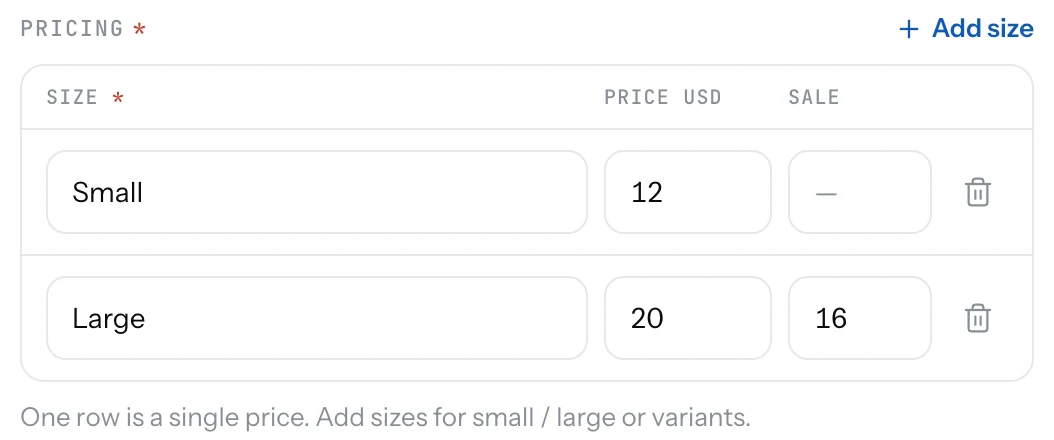
- In Pricing, type the price in the first row. Leave the size name empty if the dish has one size.
- For several sizes, add a row per size and name each one: "Small", "Large", "Half", "Full".
- To run an offer, type the lower price in the Sale column. It must be lower than the price.
- Save. The change is on your page.
Good to know
- The currency comes from your page settings and is the same for every dish.
- Guests see all sizes and prices when they open the dish. The lowest price shows on the list.
- To end an offer, clear the sale price. Nothing else changes.
- A new price shows on your page straight away, on your website within minutes, and on your TV screens within two minutes. No reprinting.
- A dish with no price shows "No price" in the Dashboard so you can spot it. Add one before you share your page.
Related
- DishesAdd a dish with a name, price, photo and description. It shows on your page the moment you save it.
- ExtrasOptional add-ons with a price: extra cheese, a sauce, a side. Attach them to the dishes they go with.
- Name, logo and descriptionThe top of your page: your logo, your name, one line under it, and a longer text about your place.